
If you’ve spent any time on a Linux or macOS terminal, you’ve probably typed cal at least once. It’s one of those tiny little utilities that’s almost too simple to matter — until you’re on a Windows machine, you need a quick calendar reference, and you realize it’s just… not there.
CMD doesn’t have it. PowerShell doesn’t have it. And I’m not about to install some third-party tool just to see what day of the week the 15th falls on.
So I built my own, and I’m kind of unreasonably happy about it.
The Fix: A cURL-Accessible Calendar Endpoint
It lives at rickys.dev/calendar and works exactly the way cal does — except you hit it with cURL instead of running a local command.
curl -L rickys.dev/calendar
That gives you the current month, plain text, right in your terminal:
      March 2026
Su Mo Tu We Th Fr Sa
 1  2  3  4  5  6  7
 8  9 10 11 12 13 14
15 16 17 18 19 20 21
22 23 24 25 26 27 28
29 30 31
Today’s date is highlighted in bold cyan — same feel as cal on Linux. On Windows it renders cleanly in Windows Terminal; classic CMD may show the ANSI codes as literal text depending on your setup.
It Takes Parameters
This is where it gets a little more useful than just a party trick.
Specific month or year:
curl -L "rickys.dev/calendar?month=6&year=2026"
curl -L "rickys.dev/calendar?year=2026"
Full year view renders 3 months across, just like cal -y.
Before and after (like cal -B and -A):
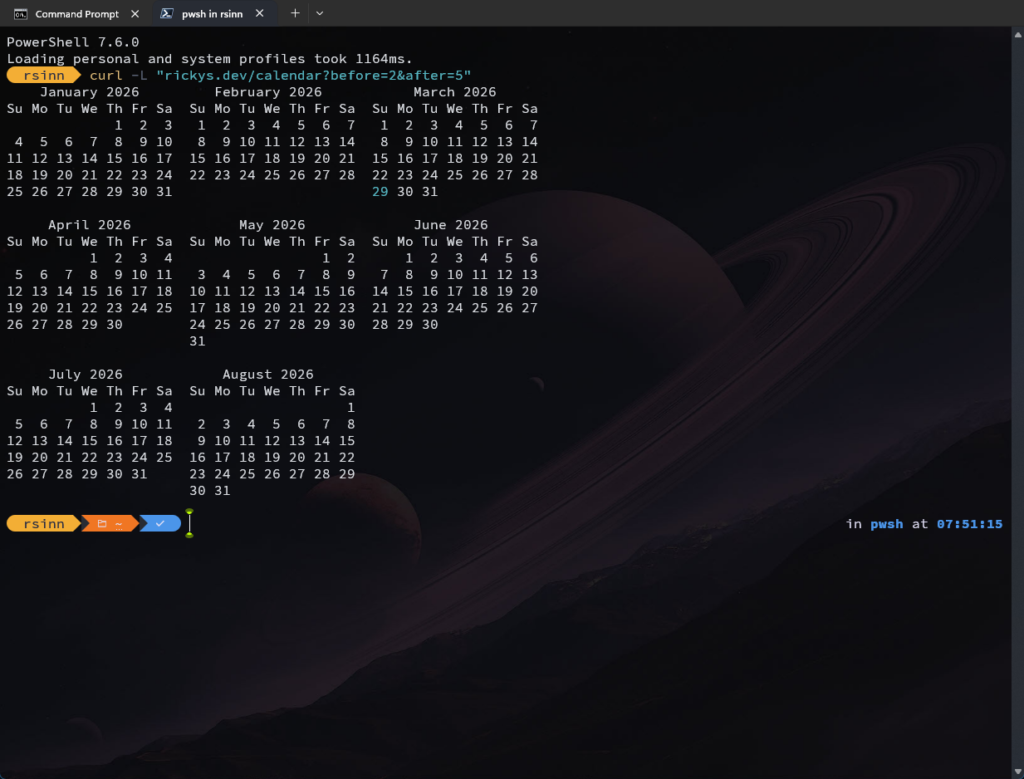
curl -L "rickys.dev/calendar?before=2&after=5"
That URL shows a rolling window of months centered on today — handy when you’re planning something that spans a few months and don’t want to keep re-running the command.
Control the column width:
curl -L "rickys.dev/calendar?year=2026&column=1"
curl -L "rickys.dev/calendar?before=2&after=5&column=2"
Stacked vertically is great for narrow terminals or piping. Two across hits a nice middle ground when you want context without the full 3-wide spread.
How It Works Under the Hood
It’s a single index.php file sitting in a calendar/ folder on the server. Nothing exotic.
When a request comes in, the script checks the User-Agent header. If it sees curl, wget, or httpie, it returns Content-Type: text/plain with ANSI escape codes for the today highlight. If it sees a browser, it returns a styled HTML page with the same calendar — navigation links included, today highlighted in amber.
You can also force plain text in a browser by appending &plain to any URL, which I mostly use for testing without opening a terminal.
The month math handles year-boundary wrapping correctly, so ?before=3 in January won’t blow up — it’ll walk back into the previous year without complaint.
Try It
If you’re on Windows and want a quick cal equivalent without installing anything, bookmark this or drop an alias in your PowerShell profile:
function cal { curl.exe -L "rickys.dev/calendar/$args" }
After that, cal just works. You can even do cal '?year=2026' and the parameters pass right through.
The full source and parameter reference are on GitHub if you want to self-host it or poke around in the code.